

Profit and Loss Statement with Auto-Calculating Totals - Editable PDF
Profit and Loss Statement with Auto-Calculating Totals - Editable PDF
Couldn't load pickup availability
- File(s) will be available for download immediately after purchase.
- Digital file(s): No physical goods will be sent.
Share
DESCRIPTION
Organize a full year of small-business income and expenses with this Profit and Loss Statement with Auto-Calculating Totals. The two-page editable PDF calculates monthly, quarterly estimated-tax installment, and annual figures using the amounts entered into the designated fields.
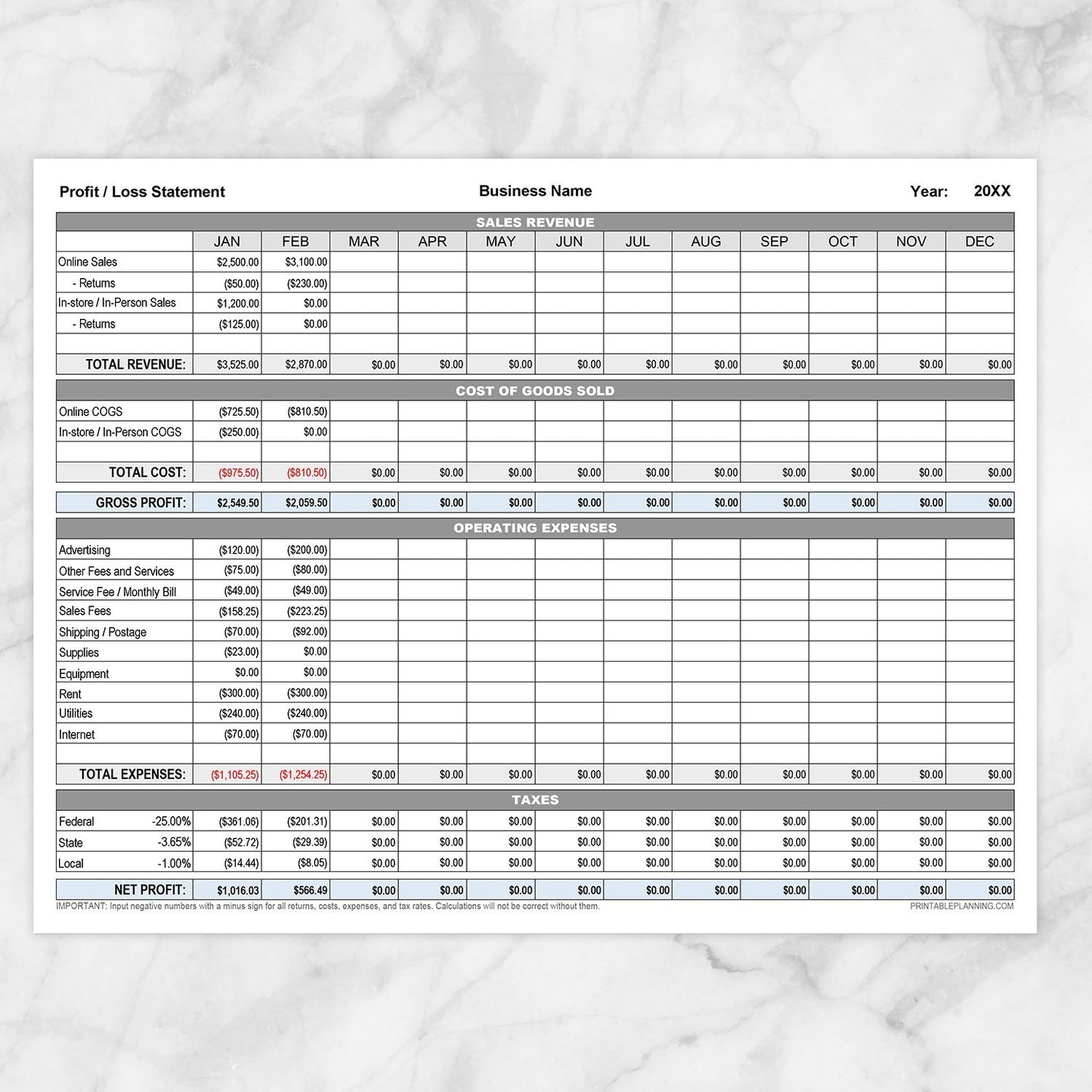
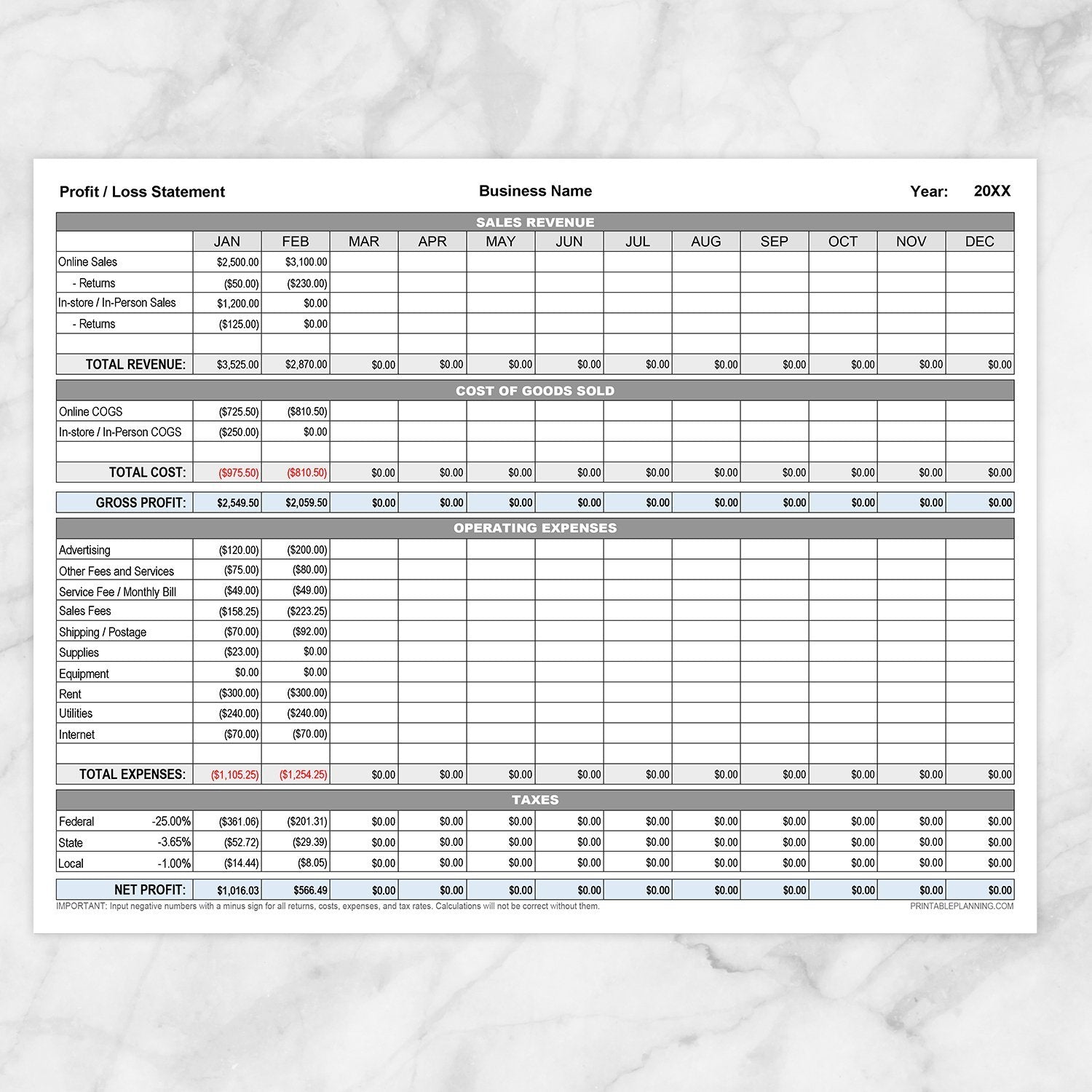
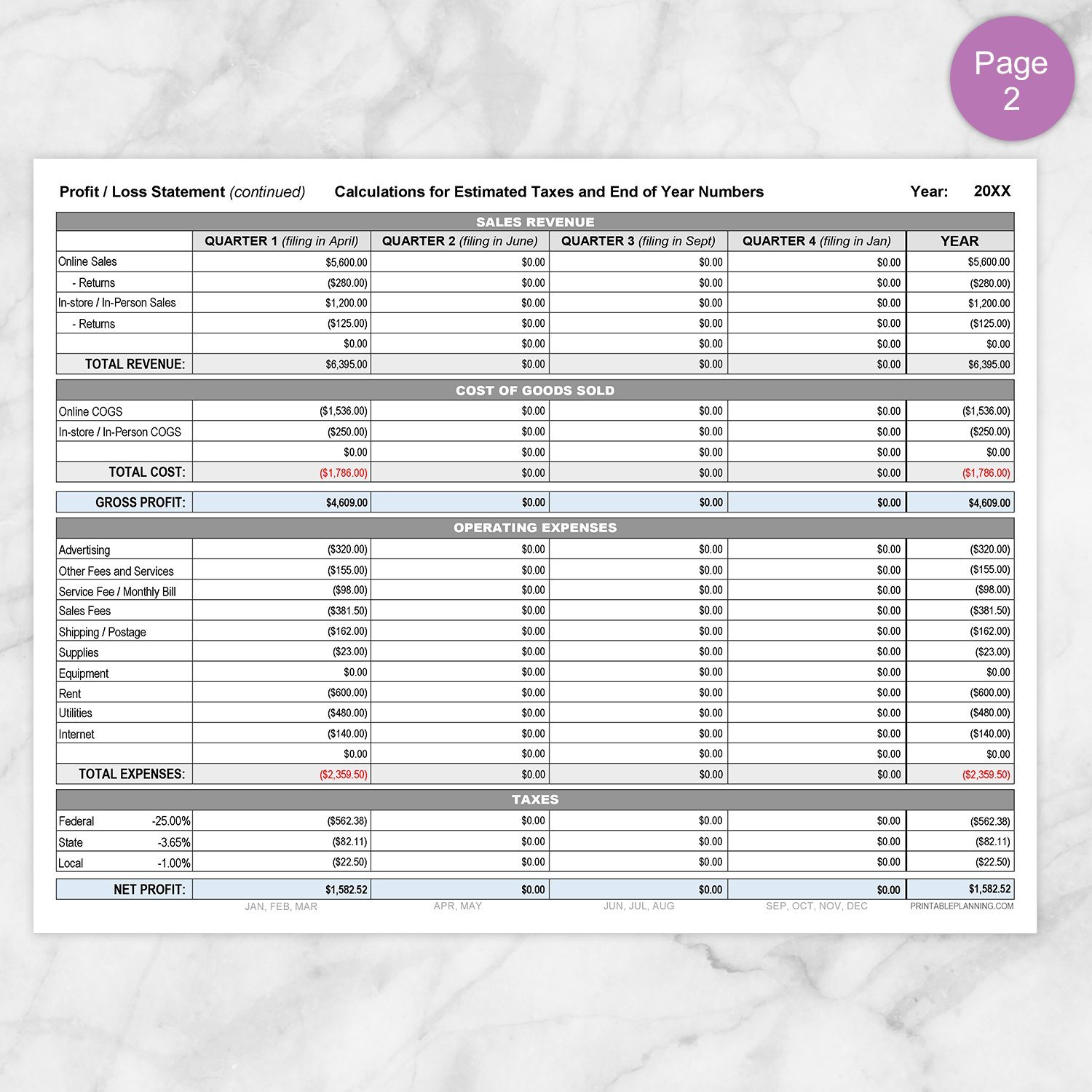
Page 1 provides a January-through-December profit and loss statement for recording sales revenue, returns, cost of goods sold, operating expenses, estimated tax percentages, gross profit, and net profit. Page 2 automatically carries those entries into Quarter 1 through Quarter 4 summaries and a complete year-end column.
Template Text and Sample Figures Included
The editable PDF opens with sample business information, category labels, amounts, and tax percentages to demonstrate how the form works. This template text is provided only as an example and should be replaced with your own business information and financial data.
Overwrite the highlighted sample entries with your own figures. The built-in calculations will update using the data you enter. Review every field carefully and replace or clear all example content (except where 0.00 would be required) before relying on the completed statement.
Monthly Profit and Loss Statement
Use Page 1 to record business activity for each month of the year. The form includes organized sections for:
- Sales Revenue: Record online sales, in-store or in-person sales, returns, and additional revenue categories.
- Cost of Goods Sold: Enter online and in-person costs, along with an additional editable line when needed.
- Gross Profit: Automatically calculated from total revenue minus total cost of goods sold.
- Operating Expenses: Record advertising, fees, shipping, supplies, equipment, rent, utilities, internet, and other business expenses.
- Estimated Taxes: Enter the federal, state, and local percentages appropriate for your own recordkeeping needs.
- Net Profit: Automatically calculated after the entered costs, expenses, and estimated tax amounts are applied.
Auto-Calculating Monthly Totals
Enter figures into the highlighted fields and allow the PDF calculations to update the related totals. The form calculates:
- Total revenue for each month
- Total cost of goods sold
- Monthly gross profit
- Total operating expenses
- Estimated federal, state, and local tax amounts
- Monthly net profit
Calculated fields may take a few seconds to refresh because the file contains a large number of editable and calculated PDF fields. Complete all applicable entries in a month before relying on the displayed total.
Quarterly Estimated-Tax and Year-End Summary
Page 2 automatically transfers and combines the information entered on Page 1. The figures are organized into four estimated-tax installment periods, labeled Quarter 1 through Quarter 4, along with a complete annual total.
- Quarter 1: Combines January, February, and March figures for the installment generally due in April.
- Quarter 2: Combines April and May figures for the installment generally due in June.
- Quarter 3: Combines June, July, and August figures for the installment generally due in September.
- Quarter 4: Combines September, October, November, and December figures for the installment generally due in January of the following year.
- Year: Displays combined totals for the full calendar year.
These groupings correspond with the four commonly referenced estimated-tax installments for calendar-year individual taxpayers. They are not four equal three-month calendar quarters.
This summary is provided only to organize the figures entered into the worksheet. It does not confirm filing requirements, calculate legally owed taxes, establish payment deadlines, prepare a tax return, or submit an estimated-tax payment.
Editable Revenue, Cost, and Expense Labels
Designated line-item labels can be changed to better reflect the categories used by your business. When a shared label is edited, the corresponding text updates where applicable on both pages.
The main sections, number of rows, formulas, fonts, colors, formatting, and overall layout are fixed as shown. Fields cannot be moved, added, deleted, or resized.
Important Number-Entry Instructions
- Enter returns, costs, operating expenses, and tax percentages as negative numbers using a minus sign.
- Enter 0.00 where a calculated field requires a value but no amount applies.
- Allow the PDF a few seconds to update after entering or changing figures.
- Review all entries carefully before using any calculated result.
- Save a fresh copy of the original file under a new filename before beginning a new business year.
Incorrect number formatting, missing minus signs, blank required fields, or incompatible PDF software may cause totals to calculate incorrectly.
Designed for Small-Business Recordkeeping
This printable may be useful for sole proprietors, independent businesses, eCommerce sellers, makers, service providers, and other small-business owners who want a structured PDF record without building a spreadsheet from scratch.
It is especially suited to users who prefer entering figures into a self-contained PDF while retaining the option to print the completed pages for a business binder or paper file.
Helpful For
- Recording monthly business revenue
- Separating online and in-person sales
- Documenting returns and cost of goods sold
- Organizing recurring operating expenses
- Reviewing monthly gross and net profit
- Combining figures into quarterly estimated-tax installment summaries
- Preparing a year-end business summary
- Maintaining editable and printable business records
- Organizing figures before consulting an accountant or tax professional
How to Use
- Open the PDF (in Adobe Reader, not the Adobe Reader internet browser window).
- Enter the business name and year.
- Replace the sample business information, category labels, figures, and tax percentages with your own data or with blank text fields and 0.00 number fields where applicable.
- Save a working copy under a new filename.
- Customize the designated revenue, cost, and expense labels if needed.
- Enter monthly sales and other positive revenue amounts.
- Enter returns, costs, expenses, and tax rates with minus signs.
- Add 0.00 to applicable fields when no amount occurred.
- Allow the calculated totals to finish updating.
- Review Page 2 for Quarter 1 through Quarter 4 and year-end summaries.
- Save the completed working file and print copies when desired.
Product Features
- Two-page editable and printable profit and loss statement
- January-through-December monthly columns
- Sales revenue and returns sections
- Online and in-person sales categories
- Cost of goods sold section
- Automatic gross-profit calculations
- Operating-expense section
- Federal, state, and local estimated-tax fields
- Automatic monthly net-profit calculations
- Quarter 1 through Quarter 4 estimated-tax installment summaries
- Automatic full-year totals
- Designated editable category labels
- Currency formatted for US dollars
- Sample template text and figures included as an editing guide
Specifications
- One two-page editable PDF file
- US Letter size: 8.5 x 11 inches
- Landscape orientation
- Gray, pale blue, black, white, and red calculation display
- Adobe Acrobat Reader recommended (not the internet browser window version)
- Formulas and calculated fields are built into the PDF
- Not a spreadsheet, accounting program, or bookkeeping application
- Does not connect with accounting, banking, tax, or eCommerce software
- Use a newly saved copy for each business year
- Print at home or through a local printing service
Explore more printable pages for business income, expenses, sales, recordkeeping, and administration in the Small Business Sheets and Forms collection.
Please note: This is a digital product. No physical item(s) will be shipped. Computer, printer, paper, writing tools, accounting software, business records, and display items are not included.
This printable is intended only for business organization, planning, and recordkeeping. It does not provide accounting, bookkeeping, tax, legal, financial, investment, payroll, compliance, or other professional advice. Its calculations depend entirely on the accuracy, completeness, formatting, categorization, and tax percentages entered by the user.
This form does not determine taxable income or tax liability, prepare or file tax returns, submit estimated-tax payments, or replace official forms, current government instructions, accounting software, or guidance from a qualified accountant, bookkeeper, tax professional, attorney, or financial professional.
Terms of Use & License Info
Terms of Use & License Info
Thank you for choosing Printable Planning! I truly hope you enjoy and get great value from the printables offered here. Below are the Terms of Use that apply to any files purchased from Printable Planning.
Please read carefully before purchasing or using your files.
Terms of Use
- Each purchase includes a single-user license. Your files are for personal use only by the individual who purchased them. Sharing, distributing, or gifting your files to others is not permitted.
- These printables may be used within your own small business or workspace to help you stay organized. However, you may not share the files with other team members or staff. If multiple people need to use the files, please purchase additional copies accordingly.
- If you would like to share a product with a friend, colleague, or audience (such as in a blog post or on social media), please link directly to the product listing on Printable Planning. Do not share the file itself or upload it to any platform.
Prohibited Uses
- You may not sell, redistribute, copy, alter, or share the digital files or printed materials derived from them.
- Files may not be edited, modified, or used to create derivative works for resale or distribution.
- Commercial resale or redistribution in any form is strictly prohibited. These products are for personal use only.
- Uploading files or designs to any file-sharing site, marketplace, or AI software for training, distribution, or resale is not allowed.
Can I share with my household or coworkers?
- You may print files for your personal use or within your own household.
- For teams or businesses: each individual using the files must purchase their own copy. Please purchase one per user.
Violation of these terms may result in loss of access to future purchases and/or legal action. We work hard to provide affordable printables and rely on your honesty and integrity to keep this small business going. Thank you for supporting a small, independently run shop!
Terms are subject to change at any time without prior notice.
Need a PDF Reader Application?
Need a PDF Reader Application?
Download Adobe Reader here: get.adobe.com/reader or download it from your mobile device's app store.
It is a free download with Adobe. To download the free version, do not upgrade to DC or Pro.
Printable Planning is not affiliated with Adobe.