

Purple Weekly Meal Planner with Grocery List - Printable PDF
Purple Weekly Meal Planner with Grocery List - Printable PDF
Couldn't load pickup availability
- File(s) will be available for download immediately after purchase.
- Digital file(s): No physical goods will be sent.
Share
DESCRIPTION
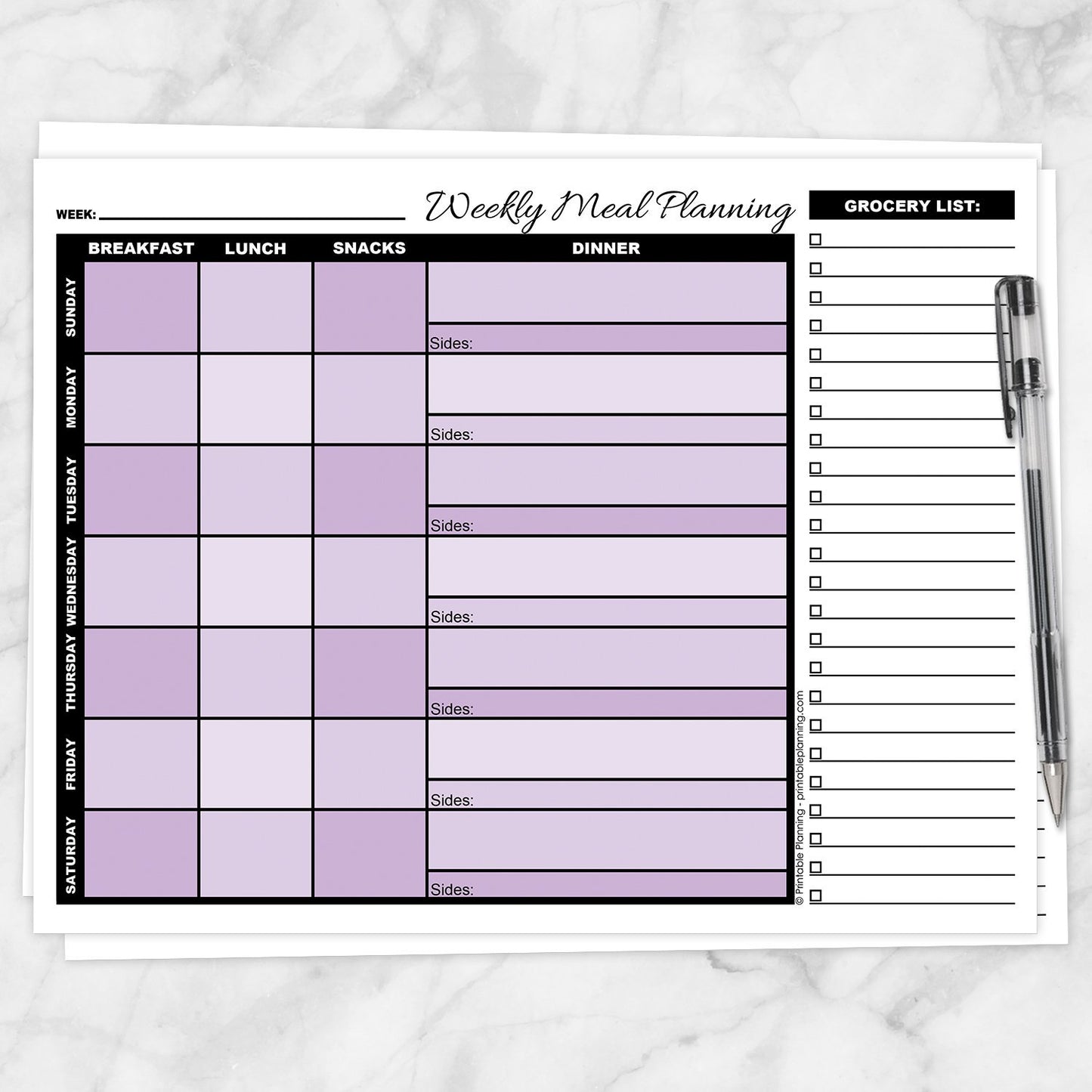
Turn scattered meal ideas into a realistic plan with this Purple Weekly Meal Planner with Grocery List. The Sunday-through-Saturday layout keeps breakfasts, lunches, snacks, dinners, side dishes, and grocery needs together on one printable page.
Coordinated purple shading helps separate the days and meal sections while keeping the weekly grid easy to follow. Use the page to balance simple meals, leftovers, packed lunches, and more involved dinners before the week begins.
Create a Realistic Seven-Day Menu
Planning the entire week in one view can help you avoid scheduling several time-consuming meals in a row or forgetting about busier days when something quick would work better.
- Breakfast: Add morning meals, simple weekday options, or foods prepared ahead.
- Lunch: Plan lunches for home, work, school, packed meals, or leftovers.
- Snacks: Record snacks and smaller foods you want available during the week.
- Dinner: Use the larger spaces for main dishes and evening meal plans.
- Sides: Keep vegetables, salads, breads, and other additions with the correct dinner.
Balance Simple Meals and More Involved Plans
Use the full-week view to match meals with the time and energy available on different days. Add easier options on busy evenings and save recipes that require more preparation for days when they are more practical.
You can also schedule leftovers, repeat favorite meals, or plan foods that use overlapping ingredients during the same week.
Make Better Use of Purchased Ingredients
Seeing the complete menu can help you notice when one ingredient could be used in more than one meal. This may make it easier to use fresh foods before they are forgotten and avoid buying an item for only one small purpose.
Check your refrigerator, freezer, and pantry before shopping, then build meals around anything that should be used soon.
Build the Grocery Checklist from the Menu
Add ingredients and other food needs to the grocery section as you plan. Each line includes an individual checkbox so items can be marked when they are purchased.
Creating the list beside the menu keeps grocery needs connected to the meals that require them and reduces the chance of forgetting an important ingredient.
Optional Cut-Away Grocery List
The grocery checklist is positioned along the right side of the page. Leave it attached when you want the menu and shopping list together, or carefully cut it away to take only the grocery section with you.
The grocery section is not perforated. Scissors are required if you choose to remove it.
Coordinated Purple Color-Coded Layout
Alternating purple day rows help distinguish Sunday through Saturday, while lighter and deeper purple tones across the meal sections add visual separation within the weekly grid.
The coordinated color palette keeps the page unified while helping you follow each day across breakfast, lunch, snacks, dinner, and sides.
Keep the Weekly Plan Easy to Reference
Use the line at the top for the starting date, ending date, week number, or another reference that works for your household.
Keep the completed planner in a convenient place so you can check upcoming meals, remember foods that need thawing, and see which ingredients were purchased for the week.
Helpful For
- Creating a realistic Sunday-through-Saturday menu
- Balancing quick meals with recipes requiring more preparation
- Planning breakfasts, lunches, snacks, dinners, and sides
- Scheduling leftovers and repeat meals
- Using ingredients across multiple dishes
- Building a grocery checklist directly from the menu
- Remembering ingredients already purchased for planned meals
- Reducing last-minute decisions about what to prepare
How to Use
- Write the applicable week or date range at the top.
- Review the week for busier and less demanding days.
- Plan breakfasts, lunches, snacks, dinners, and sides.
- Add leftovers or simple meals where they fit best.
- Write missing ingredients on the grocery checklist.
- Remove anything already available at home.
- Take the complete page shopping or carefully cut away the grocery list.
- Keep the menu nearby for reference throughout the week.
Product Features
- One-page weekly meal planner
- Sunday-through-Saturday layout
- Separate breakfast, lunch, snack, and dinner columns
- Dedicated side-dish space beneath every dinner
- Coordinated purple shading with alternating day rows
- Line for the week or date range
- Lined grocery checklist with individual checkboxes
- Grocery section may be carefully cut away if desired (not perforated)
- Undated format for repeated weekly use
- Designed to be completed by hand
Specifications
- One printable PDF page
- US Letter size: 8.5 x 11 inches
- Landscape orientation
- Purple, black, and white design
- Print a fresh copy each week or whenever needed
- Print at home or through a local printing service
Use one page to create a manageable weekly menu, coordinate grocery needs, and keep planned ingredients and meals from being forgotten as the week unfolds.
Explore more printable menu planners, grocery lists, and kitchen organization pages in the Meal Planning and Grocery Lists collection.
Please note: This is a digital product. No physical item(s) will be shipped. Paper, writing tools, scissors, food, and display items are not included.
This printable is intended only for personal meal planning, organization, and recordkeeping. It does not provide dietary, nutritional, medical, allergy, food-safety, or health advice and is not a substitute for guidance from a qualified professional.
Terms of Use & License Info
Terms of Use & License Info
Thank you for choosing Printable Planning! I truly hope you enjoy and get great value from the printables offered here. Below are the Terms of Use that apply to any files purchased from Printable Planning.
Please read carefully before purchasing or using your files.
Terms of Use
- Each purchase includes a single-user license. Your files are for personal use only by the individual who purchased them. Sharing, distributing, or gifting your files to others is not permitted.
- These printables may be used within your own small business or workspace to help you stay organized. However, you may not share the files with other team members or staff. If multiple people need to use the files, please purchase additional copies accordingly.
- If you would like to share a product with a friend, colleague, or audience (such as in a blog post or on social media), please link directly to the product listing on Printable Planning. Do not share the file itself or upload it to any platform.
Prohibited Uses
- You may not sell, redistribute, copy, alter, or share the digital files or printed materials derived from them.
- Files may not be edited, modified, or used to create derivative works for resale or distribution.
- Commercial resale or redistribution in any form is strictly prohibited. These products are for personal use only.
- Uploading files or designs to any file-sharing site, marketplace, or AI software for training, distribution, or resale is not allowed.
Can I share with my household or coworkers?
- You may print files for your personal use or within your own household.
- For teams or businesses: each individual using the files must purchase their own copy. Please purchase one per user.
Violation of these terms may result in loss of access to future purchases and/or legal action. We work hard to provide affordable printables and rely on your honesty and integrity to keep this small business going. Thank you for supporting a small, independently run shop!
Terms are subject to change at any time without prior notice.
Need a PDF Reader Application?
Need a PDF Reader Application?
Download Adobe Reader here: get.adobe.com/reader or download it from your mobile device's app store.
It is a free download with Adobe. To download the free version, do not upgrade to DC or Pro.
Printable Planning is not affiliated with Adobe.