

School Staff Daily Planner with Schedule and To-Do List - Printable PDF
School Staff Daily Planner with Schedule and To-Do List - Printable PDF
Couldn't load pickup availability
- File(s) will be available for download immediately after purchase.
- Digital file(s): No physical goods will be sent.
Share
DESCRIPTION
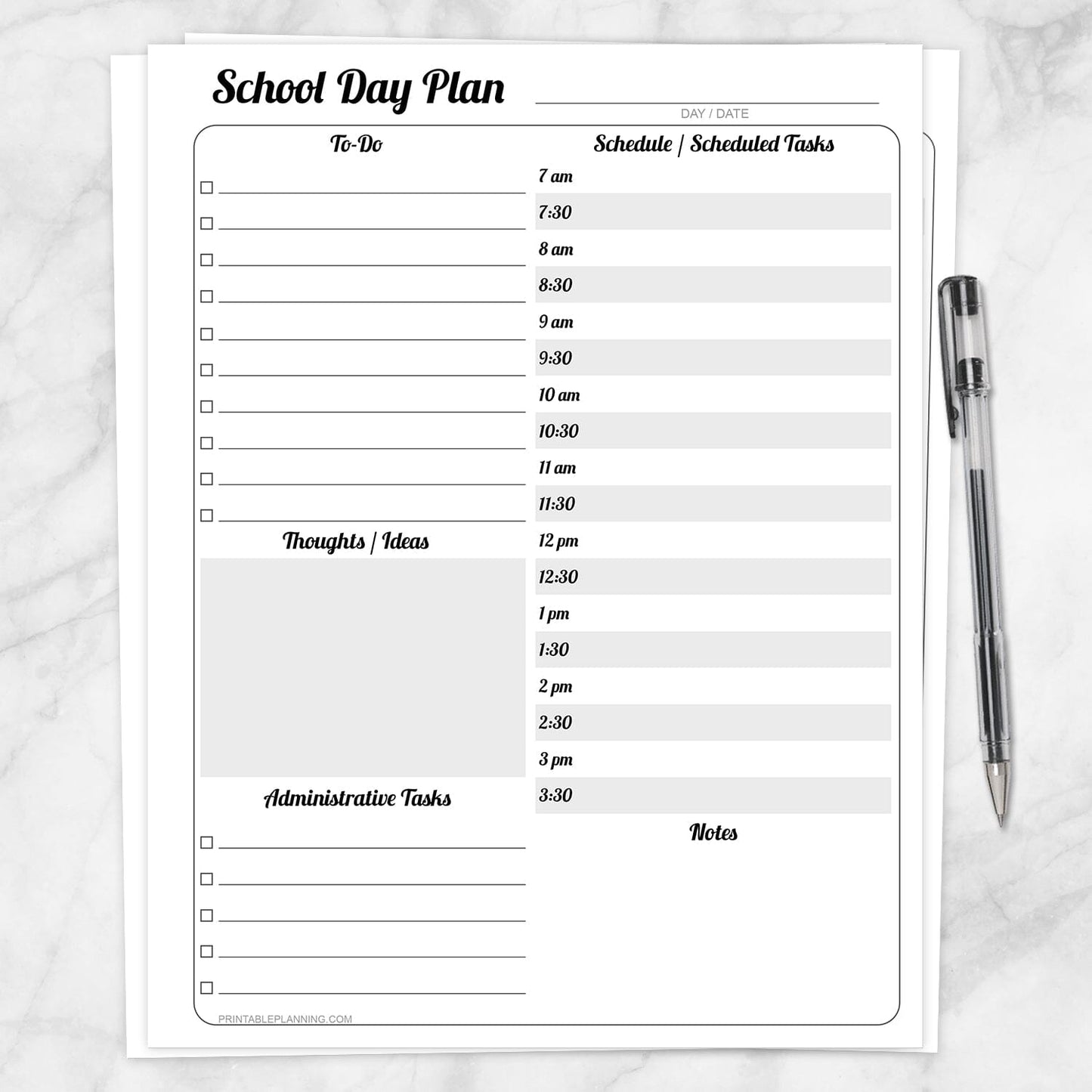
Keep tasks, scheduled responsibilities, administrative work, ideas, and notes together with this School Staff Daily Planner with Schedule and To-Do List. The one-page layout provides a clear overview of what needs to be completed and when time is already committed.
Designed for teachers and other school professionals, this undated planner can be used by counselors, office staff, administrators, support personnel, specialists, tutors, and homeschool educators. Use it for regular school days, meetings, appointments, student support, paperwork, planning periods, professional development, or any day that benefits from a written schedule and task checklist.
Plan the Complete School Day
- To-Do List: Record teaching tasks, office responsibilities, counseling follow-ups, preparation work, paperwork, and other items that need attention.
- School Day Schedule: Organize appointments, classes, meetings, planning periods, student support, and scheduled tasks in 30-minute intervals from 7:00 AM through 3:30 PM.
- Thoughts and Ideas: Use the open box for lesson inspiration, program ideas, reminders, brainstorming, meeting takeaways, or items to revisit later.
- Administrative Tasks: Keep forms, attendance records, communication, scheduling, documentation, and other administrative responsibilities separate from the main to-do list.
- Notes: Record additional details, observations, meeting information, student reminders, or anything that does not fit into the other sections.
Half-Hour School Day Schedule
The right side of the page includes scheduling spaces every 30 minutes from 7:00 AM through 3:30 PM. Use these time slots for classes, meetings, appointments, duty periods, planning time, student support, office coverage, counseling sessions, and other scheduled responsibilities.
Flexible tasks can remain on the checklist, helping you distinguish between work that must happen at a particular time and work that can be completed when an opening becomes available.
Separate Scheduled Work and Administrative Tasks
School days often include appointments, meetings, student support, paperwork, communication, and follow-ups alongside regular responsibilities. Separate sections help keep time-specific commitments from becoming mixed into one long task list.
Use the Administrative Tasks section for forms, attendance records, reports, emails, phone calls, parent or guardian communication, supply requests, scheduling, documentation, or other school-related responsibilities.
Capture Thoughts Before They Are Forgotten
The Thoughts and Ideas box provides room for information that does not belong in a scheduled time slot or short checklist line. Add lesson ideas, student support notes, office process reminders, activities to research, program ideas, questions, or items to revisit later.
Useful for Teachers and School Professionals
- Classroom teachers
- Special education teachers
- Substitute teachers
- School counselors
- Front office and attendance staff
- Administrative assistants
- Principals and school administrators
- Instructional coaches and specialists
- School nurses and support personnel
- Tutors and intervention staff
- Homeschool educators
- Anyone managing a structured school-day schedule
Designed for a School Planning Binder
The page is shifted slightly toward the right to leave additional space along the left edge for a standard three-hole punch. Print a fresh sheet as needed and keep completed daily plans in a teacher, school office, counseling, or administrative planning binder.
Binder storage can also make previous pages easier to reference when reviewing completed tasks, meeting notes, student support information, or ideas saved for future use.
How to Use
- Write the day and date at the top.
- Add flexible responsibilities to the To-Do section.
- Place time-specific commitments in the half-hour schedule.
- Record paperwork and follow-ups under Administrative Tasks.
- Use the Thoughts and Ideas box for brainstorming and future reminders.
- Add supporting details in the Notes area.
- Check off tasks as they are completed.
Product Features
- One-page undated school staff daily planner
- To-do checklist for teaching, office, counseling, and administrative tasks
- Half-hour schedule from 7:00 AM through 3:30 PM
- Dedicated Thoughts and Ideas box
- Separate Administrative Tasks checklist
- Open notes area
- Day and date line
- Alternating grayscale schedule rows
- Extra left margin for three-hole punching
- Designed to be completed by hand
Specifications
- One printable PDF page
- US Letter size: 8.5 x 11 inches
- Portrait orientation
- Black, white, and grayscale design
- Undated for flexible use throughout the school year
- Suitable for a standard three-ring planning binder
- Print at home or through a local printing service
Print a new page whenever you need one place to coordinate school-day tasks, scheduled responsibilities, administrative work, student support, ideas, and notes.
Explore more printable lesson-planning pages, school forms, and organization tools for educators and school professionals in the School and Teachers collection.
Please note: This is a digital product. No physical item(s) will be shipped. Binder, paper, writing tools, classroom supplies, office supplies, and display items are not included.
This printable is intended only for personal or professional planning, organization, and recordkeeping. It does not provide educational, legal, employment, counseling, administrative, or other professional advice.
Terms of Use & License Info
Terms of Use & License Info
Thank you for choosing Printable Planning! I truly hope you enjoy and get great value from the printables offered here. Below are the Terms of Use that apply to any files purchased from Printable Planning.
Please read carefully before purchasing or using your files.
Terms of Use
- Each purchase includes a single-user license. Your files are for personal use only by the individual who purchased them. Sharing, distributing, or gifting your files to others is not permitted.
- These printables may be used within your own small business or workspace to help you stay organized. However, you may not share the files with other team members or staff. If multiple people need to use the files, please purchase additional copies accordingly.
- If you would like to share a product with a friend, colleague, or audience (such as in a blog post or on social media), please link directly to the product listing on Printable Planning. Do not share the file itself or upload it to any platform.
Prohibited Uses
- You may not sell, redistribute, copy, alter, or share the digital files or printed materials derived from them.
- Files may not be edited, modified, or used to create derivative works for resale or distribution.
- Commercial resale or redistribution in any form is strictly prohibited. These products are for personal use only.
- Uploading files or designs to any file-sharing site, marketplace, or AI software for training, distribution, or resale is not allowed.
Can I share with my household or coworkers?
- You may print files for your personal use or within your own household.
- For teams or businesses: each individual using the files must purchase their own copy. Please purchase one per user.
Violation of these terms may result in loss of access to future purchases and/or legal action. We work hard to provide affordable printables and rely on your honesty and integrity to keep this small business going. Thank you for supporting a small, independently run shop!
Terms are subject to change at any time without prior notice.
Need a PDF Reader Application?
Need a PDF Reader Application?
Download Adobe Reader here: get.adobe.com/reader or download it from your mobile device's app store.
It is a free download with Adobe. To download the free version, do not upgrade to DC or Pro.
Printable Planning is not affiliated with Adobe.